

Andy Mossack reviews the new Logitech MX Master 4 Wireless mouse and finds an unexpected upgrade to its predecessor.
It was only last May when I reviewed the Logitech Master 3S wireless mouse and found it an absolute game changer. I remember at the time thinking, this is not just a thing of beauty, it is ergonomically perfect, runs on any surface and is fully customisable. It doesn’t get any better than this.
Just goes to show how wrong you can be doesn’t it, as Logitech has gone better than that. A lot better with the new MX Master 4 mouse.
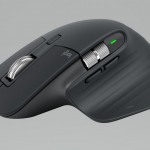
The brilliant ergonomic design has been enhanced with a small size change to not only cosy into your palm more securely but offer a larger thumb area, now called the haptic sense panel, that provides greater grip. Just as well, as that thumb of yours is now the focus of a lot more interaction.

A single press brings up a new Actions Ring function shortcut where you can assign your favourite tools and actions to your cursor. Logitech claims it is possible to reduce your mouse movements by up to 63%. Add to this, the opportunity to customize a variety of haptic responses to your thumb for various actions such as gesturing, grid snapping, short cuts and many third party addons via the Logitech + software including Photoshop and Lightroom.
Next, the excellent MagSpeed Scroll Wheel has been improved by making lighter and smoother but still retaining the two-part performance: ratchet mode for precise scrolling or hyper fast mode can still scroll up to 1,000 lines a second. While we’re on the subject of scroll wheels, the horizontal scroll wheel just above the thumb panel, (which was also a feature on the MX Master 3S,) has been improved with a considerable increase in sideways scrolling speed. A function I suspect would be a brilliant advantage to coders or spreadsheet users.

This MX Master 4 Mouse still delivered fantastic tracking across all the numerous surfaces I tested it on including glass, as did the MX Master 3S, thanks to the retained 8K DPI optical sensor.
There is also noise reduction over its predecessor. The clicks are quieter and the mouse glides smoother.
So far so much better then.
Another excellent function is the easy switch option, where you can connect up to three devices and switch between them either using the Actions Ring, or the Easy Switch buttons on the mouse. Then you’ll be able to transfer files seamlessly using the Logitech + software. And the mouse is compatible seamlessly across all major operating systems right out of the box.
Final thoughts
The MX Master 4 Mouse is a fantastic upgrade for anyone using a standard or wireless mouse, The build quality and functionality is outstanding, making it easily the best mouse on the market. I would even go as far as to say it would even be worth upgrading from your MX Master 3S.
A word or two of warning though. The MX Master 4 comes with a LogiBolt dongle as does the MX Master 3S. However, this one uses a USB-C so you’ll need to get an adapter if your computer only has USB-A ports.
The other thing I noticed is it is easy to accidentally press the haptic sense panel when you don’t want to, when playing a game for example. Probably best to switch off the function when playing just in case.
Please also note this is a right-handed mouse. If you are a leftie, there is currently no version planned for you yet.
Tell me more about the Logitech MX Master 4 Wireless Mouse
Logitech MX Master 4 Wireless Mouse £119.99 Also compaitble with the wirelss Ligitech MX Keys Mini
If you enjoyed this review, why not check out these similar posts:
 Logitech MX Master 3S wireless mouse. Discover Limitless Customisation.
 Logitech Pop Icon Combo reviewed. Excellent wireless keyboard and mouse are a top pairing
 Logitech MX Keys Mini wireless keyboard. Discover this brilliant pocket rocket
 Adam Handling at Caxton. Incredible food from a master chef.


